t113-s3 tina系统由spi nand flash更换为spi nor flash ???

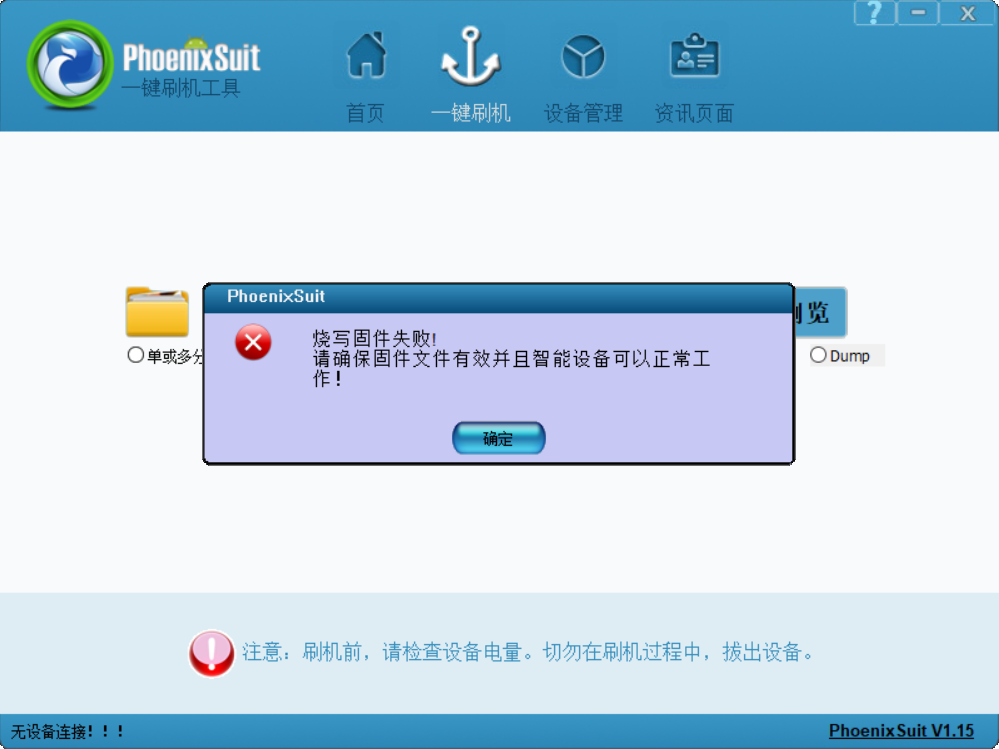
请问t113-s3 tina系统由spi nand flash更换为spi nor flash ???的流程是什么 根据 Tina Linux 存储介质切换:eMMC,SPI NAND,SPI NOR,SD Card,SD NAND | 全志在线开发者论坛这个链接的步骤做的镜像tina_t113-100ask_uart3_nor.img烧录失败 下面是我做的修改 : spinand切换spinor

1、cd /home/zyn/t113/tina-d1-h/device/config/chips/t113/configs/100ask vim sys_config.fex

28 ;storage_type = 5
29 storage_type = 3

vim board.dts

758 &spi0 {
759 clock-frequency = <100000000>;
760 pinctrl-0 = <&spi0_pins_a &spi0_pins_b>;
761 pinctrl-1 = <&spi0_pins_c>;
762 pinctrl-names = “default”, “sleep”;
763 /spi-supply = <&reg_dcdc1>;/
764 spi_slave_mode = <0>;
765 spi0_cs_number = <1>;
766 spi0_cs_bitmap = <1>;
767 // status = “okay”;
768 status = “disabled”;
769
770 spi-nand@0 {
771 compatible = “spi-nand”;
772 spi-max-frequency=<80000000>;
773 reg = <0x0>;
774 spi-rx-bus-width=<0x04>;
775 spi-tx-bus-width=<0x04>;
776 // status=“okay”;
777 status = “disabled”;
778 };
779 };

==================================================================================================================================

make kernel_menuconfig

内核驱动配置
Device Driver —>
Memory Technology Device (MTD) support —>
sunxi-nand —> //取消勾选
<> AWNAND CHOICE (Allwinner MTD SPINAND Device Support) —>
[] enable simulate multiplane

选中<*> SPI-NOR device support —>

内核文件系统配置
File systems —>
[] Miscellaneous filesystems —>
<
> Overlay filesystem support 选中
<*> Journalling Flash File System v2 (JFFS2) support 选中
取消ubifs
< > UBIFS file system support


make menuconfig 层层选中
Target Images —>
[*] For storage less than 32M, enable this when using ota //选中

[*] squashfs ← 强烈建议选中(压缩根文件系统,省空间)

[ ] ubifs ---- 取消

Global build settings —>
[*] Strip unnecessary functions from libraries //选中

Utilities —>
<> mtd-utils
<
> mtd-utils-mkfs.jffs2 //选中 方案二:
缺少 sun8iw20p1_uart3_nor_defconfig 配置文件。T113的NOR Flash默认配置是UART0(sun8iw20p1_nor_defconfig),
但你的开发板使用的是UART3。

cd /home/zyn/t113/tina-d1-h/lichee/brandy-2.0/u-boot-2018/configs

cp sun8iw20p1_nor_defconfig sun8iw20p1_uart3_nor_defconfig

cat >> sun8iw20p1_uart3_nor_defconfig << ‘EOF’

UART3 Configuration (for 100ASK T113-PRO)

CONFIG_CONS_INDEX=4
CONFIG_SPECIFY_CONSOLE_INDEX=y
CONFIG_DEBUG_UART_BASE=0x02500C00
CONFIG_DEBUG_UART_CLOCK=24000000
CONFIG_BAUDRATE=115200
EOF
验证
grep -E “(CONS_INDEX|DEBUG_UART|BAUDRATE)” sun8iw20p1_uart3_nor_defconfig
[1018]fes begin commit:88480af-dirty
[1022]set pll start
[1024]fix vccio detect value:0xc0
[1031]periph0 has been enabled
[1034]set pll end
[1036][pmu]: bus read error
[1038]board init ok
[1040]beign to init dram
[1042]ZQ value = 0x31
[1044]get_pmu_exist() = -1
[1047]ddr_efuse_type: 0xa
[1049]trefi:7.8ms
[1052][AUTO DEBUG] single rank and full DQ!
[1056]ddr_efuse_type: 0xa
[1059]trefi:7.8ms
[1061][AUTO DEBUG] rank 0 row = 13
[1064][AUTO DEBUG] rank 0 bank = 8
[1068][AUTO DEBUG] rank 0 page size = 2 KB
[1072]DRAM BOOT DRIVE INFO: V0.33
[1075]DRAM CLK = 936 MHz
[1077]DRAM Type = 3 (2:DDR2,3:DDR3)
[1080]DRAMC read ODT off.
[1083]DRAM ODT value: 0x42.
[1086]ddr_efuse_type: 0xa
[1089]DRAM SIZE =128 M
[1091]dram_tpr4:0x0
[1093]PLL_DDR_CTRL_REG:0xf8004d00
[1096]DRAM_CLK_REG:0xc0000000
[1099][TIMING DEBUG] MR2= 0x20
[1103]DRAM simple test OK.
[1105]rtc standby flag is 0x0, super standby flag is 0x0
[1111]init dram ok

U-Boot 2018.05-00001-gb315f67-dirty (Mar 05 2026 - 17:00:08 +0800) Allwinner Technology

[02.573]CPU: Allwinner Family
[02.575]Model: sun8iw20
[02.578]DRAM: 128 MiB
[02.581]Relocation Offset is: 04f4b000
[02.596]secure enable bit: 0
[02.598]CPU=1008 MHz,PLL6=600 Mhz,AHB=200 Mhz, APB1=100Mhz MBus=300Mhz
[02.604]gic: normal mode
[02.607]flash init start
[02.609]workmode = 16,storage type = 0
[02.618]spi sunxi_slave->max_hz:100000000
SF: Detected gd25q128 with page size 256 Bytes, erase size 64 KiB, total 16 MiB
[02.629]Loading Environment from SUNXI_FLASH… OK
Hit any key to stop autoboot: 0
sunxi work mode=0x10
run usb efex
delay time 2500
weak:otg_phy_config
usb init ok
set address 0x4
set address 0x4 ok
set address 0x4
set address 0x4 ok
SUNXI_EFEX_ERASE_TAG
erase_flag = 0x12
origin_erase_flag = 0x1
FEX_CMD_fes_verify_status
FEX_CMD_fes_verify last err=0
the 0 mbr table is ok
MBR DUMP**
total mbr part 6

part[0] name :boot-resource
part[0] classname :DISK
part[0] addrlo :0x20
part[0] lenlo :0x100
part[0] user_type :32768
part[0] keydata :0
part[0] ro :0

part[1] name :env
part[1] classname :DISK
part[1] addrlo :0x120
part[1] lenlo :0x100
part[1] user_type :32768
part[1] keydata :0
part[1] ro :0

part[2] name :env-redund
part[2] classname :DISK
part[2] addrlo :0x220
part[2] lenlo :0x100
part[2] user_type :32768
part[2] keydata :0
part[2] ro :0

part[3] name :boot
part[3] classname :DISK
part[3] addrlo :0x320
part[3] lenlo :0x3200
part[3] user_type :32768
part[3] keydata :0
part[3] ro :0

part[4] name :rootfs
part[4] classname :DISK
part[4] addrlo :0x3520
part[4] lenlo :0x4b00
part[4] user_type :32768
part[4] keydata :0
part[4] ro :0

part[5] name :UDISK
part[5] classname :DISK
part[5] addrlo :0x8020
part[5] lenlo :0x0
part[5] user_type :0
part[5] keydata :0
part[5] ro :0

need erase flash: 18
The Chip Erase size is: 16M …
SUNXI_EFEX_MBR_TAG
mbr size = 0x4000
SF: write offset not multiple of erase size
write primary GPT success
spinor: skip backup GPT
[29.102]update partition map
FEX_CMD_fes_verify_status
FEX_CMD_fes_verify last err=0
FEX_CMD_fes_verify_value, start 0x120, size high 0x0:low 0x20000
FEX_CMD_fes_verify_value 0x5d1b0f19
FEX_CMD_fes_verify_value, start 0x220, size high 0x0:low 0x20000
FEX_CMD_fes_verify_value 0x5d1b0f19
FEX_CMD_fes_verify_value, start 0x320, size high 0x0:low 0x3da800
FEX_CMD_fes_verify_value 0x6178ce2c
FEX_CMD_fes_verify_value, start 0x3520, size high 0x0:low 0x360000
FEX_CMD_fes_verify_value 0x3707a933
bootfile_mode=4
SUNXI_EFEX_BOOT1_TAG
boot1 size = 0x120000, max size = 0x200000
uboot size = 0x120000
storage type = 3
toc last block :0x980, over write logical sector starts at block:0x7e0
stop toc download

上面的log是通过PhoenixSuit.exe烧录的信息